
If your FileInvite Login URL ends in fileinvite.com, please use this knowledge base instead.
Due dates on Invites are now optional. You can send an Invite without specifying a deadline — useful when completion timelines are flexible or uncertain — and add or remove one at any time.
Getting Started
Before configuring a due date, open an existing Invite or create a new one. See Invites Management Page for more details.
Steps to Send an Invite Without a Due Date
- Open an existing Invite or create a new one
- Click Invite Actions and select Edit Invite
- Leave the Due Date field blank
- Click Save
The Invite will be sent without a deadline. Borrowers will still receive the Invite and can complete it at any time.
Steps to Remove a Due Date from a Sent Invite
- From the Manage Invites page, open the relevant Invite
- Click Invite Actions and select Edit Invite
- Clear the Due Date field
- Click Save
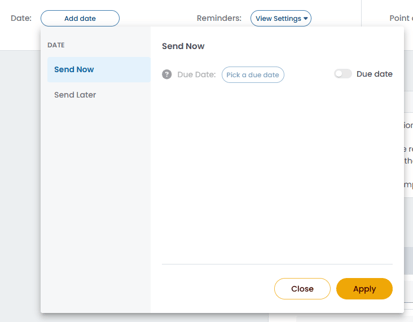
Steps to Add a Due Date Back
- From the Manage Invites page, open the relevant Invite
- Click Invite Actions and select Edit Invite
- Enter a date in the Due Date field
- Click Save
Important Notes:
- Removing a due date affects how reminders behave on that Invite. See Ongoing Reminders for details.
- When using Bulk Actions to update due dates across multiple Invites, the date field can also be cleared to remove due dates in bulk. See Bulk Actions on the Manage Invites Page for more details.
💡 Best Practice: For borrowers who need more time, removing the due date and enabling ongoing reminders ensures they continue to receive notifications without a hard deadline creating unnecessary pressure.
🎉 Your borrowers can now complete their Invites at their own pace! 🎉