
If your FileInvite Login URL ends in fileinvite.com, please use this knowledge base instead.
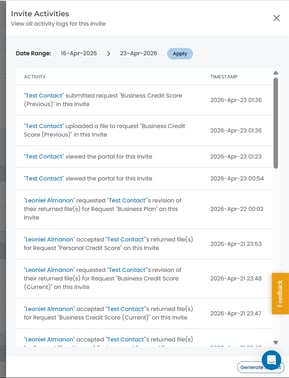
Invite Activities gives you a detailed record of all actions taken on an Invite by both borrowers and senders — without needing to export a CSV file. You can filter the activity list by date range and generate a report directly from the panel.
Getting Started
Before accessing Invite Activities, open an existing Invite from the Manage Invites page. See Invites Management Page for more details.
What Gets Recorded
The Invite Activities panel records both borrower and sender actions, including:
- Borrower viewed the portal
- Borrower uploaded a file to a request
- Borrower submitted a request
- Sender accepted a returned file
- Sender requested a revision on a returned file
Each entry is displayed with the name of the person who performed the action and the exact timestamp.
Steps to Access Invite Activities
- From the Manage Invites page, open the relevant Invite
- Click the Invite Actions dropdown
- Select Invite Activities
- The Invite Activities panel opens, showing a chronological list of activity entries
Filtering by Date
To narrow the activity list to a specific period:
- In the Date Range fields at the top of the panel, set your start and end dates
- Click Apply
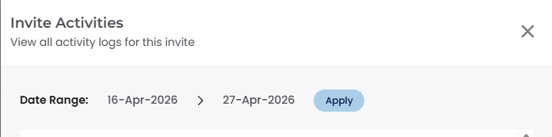
The panel updates to show only entries within the selected range.
Generating a Report
To export the activity log:
- Click Generate Report at the bottom-right of the panel
- A report will be generated based on the current date range filter
Note: All timestamps reflect your account's configured time zone. The panel is read-only — entries cannot be edited or deleted.
💡 Best Practice: Use the date range filter to narrow activity to a specific review period before clicking Generate Report, to keep the export focused and relevant for your team or compliance purposes.
🎉 You now have a full audit trail for every Invite, available at any time! 🎉